On-device reactions
Oneira's expressive reactions run on the device, so its face can respond without relying on a cloud request.
See the local coreArchitecture guide / Connected beta, your stack
A Connected beta bring-your-own-service path separates the physical interface from any optional compatible connected tool you configure. See the setup, permissions, and limits.
Product status
Working today means the expressive face has been demonstrated on a real Oneira device.
Connected beta features require the Oneira app, internet access, a compatible service, and permissions you approve. They can change and may not work with every service.
The short answer
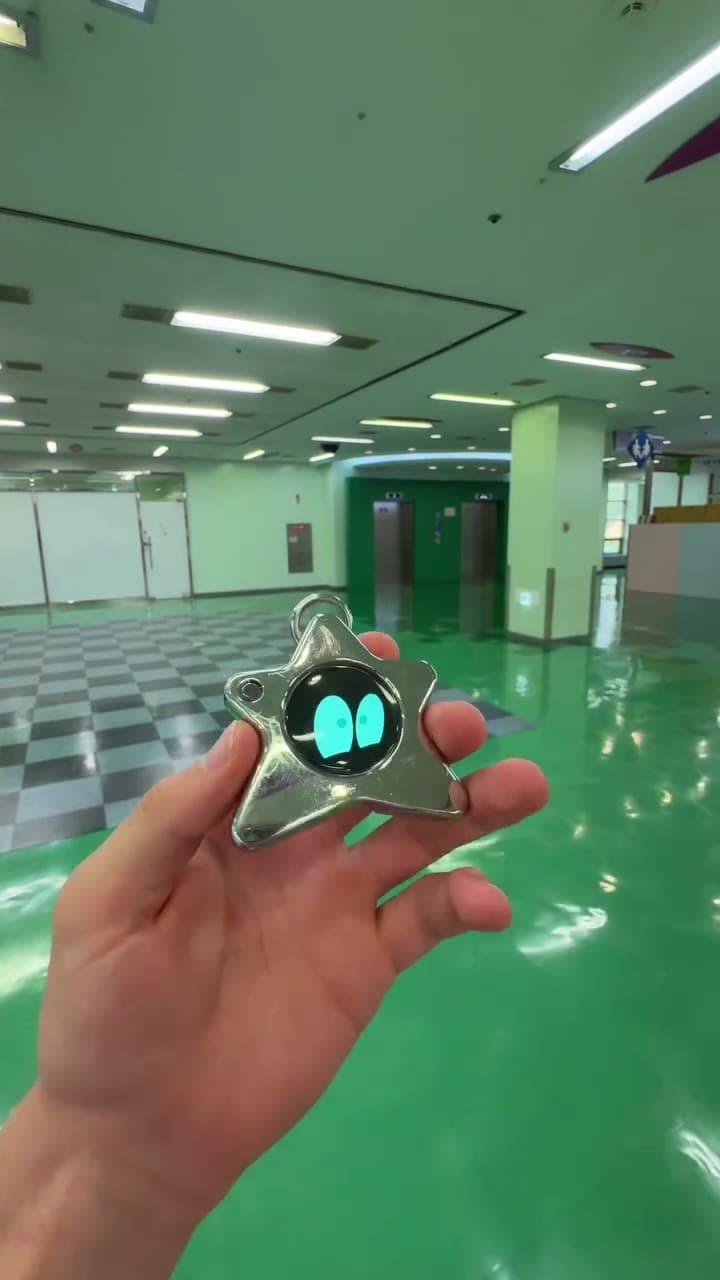
Oneira Dream Big+
Small enough to look playful. Built with a dual AI chip, OLED screen, and 1K camera, plus optional connected experiences you control.
Each $80 Founding Unit includes one Oneira device with a dual AI chip, OLED screen, and 1K camera, plus the selected color and included eye set. The 1K camera is included; its final production module and other non-material production details may change before fulfillment. Optional connected services, provider accounts, usage, and third-party fees are separate.
Oneira's expressive reactions run on the device, so its face can respond without relying on a cloud request.
See the local coreThe working prototype includes a dual ai chip, oled screen, and 1k camera. The 1K camera is included in the $80 Founding Unit; its final production module may change before fulfillment.
Inspect the hardwareOptional compatible connected services can extend Oneira when you choose. Setup, permissions, internet access, provider terms, and usage costs remain separate. Connected experiences work only with compatible services the owner deliberately configures. Oneira does not connect automatically to every service.
See compatible connectionsCompatible connected tools are optional and owner-configured. Nothing is preconfigured, and universal compatibility is not promised.
See connected featuresThe 1K camera supports deliberate, owner-triggered experiences. Optional Dream creation can transform a photo when the owner chooses it.
Open Oneira CreateOptional helper experiences have narrow, visible limits. Broader research, coding, and workspace actions remain in development.
Understand the agent pathA simple flow
Starts a deliberate request
Routes it under the owner's configuration
Returns a result through the connected path
Why bring your own
Model quality, privacy terms, tool access, and reliability change faster than physical hardware. Connected beta lets a compatible configuration evolve without treating every provider as supported.
Each connection is configured separately in the app. Accounts, API access, provider terms, credentials, hosting, availability, and usage fees may all sit outside the hardware purchase and can change.
What stays local
Core animated expressions respond to movement on the hardware. That local baseline is distinct from connected requests sent through the app.
Do not confuse the local expression experience with optional compatible connected tools and services. Review each feature's status before buying.
Compatibility
A service or tool must be compatible with the Oneira app and correctly configured. Authentication, network access, permissions, availability, limits, and provider changes can all affect support.
Use narrow credentials, test read-only actions first, require confirmation for consequential work, and revoke access you no longer use.
Bring your own AI / keep the hardware, choose the service deliberately
Oneira keeps the local and optional connected experiences distinct. Its core animated expression responds to motion on-device. In Connected beta, an owner can intentionally configure an optional compatible connected tool or service in the Oneira app. This is not a promise of universal compatibility or a permanent connection to every service.
The practical benefit is flexibility. The practical responsibility is that each connection has an account, permissions, service terms, availability, possible fees, and behavior that can change. Sight is a distinct Connected beta visual flow with a single owner-triggered frame. Everyone present must agree before an owner-triggered Sight capture. Translation and creator assistance are still in development, so they should not be counted as today's available features.
Decision framework
Connected tools and services can serve different jobs. Start with the task you need, then choose a compatible service that can perform that exact job. One successful connection does not prove every future tool will be supported.
A secure setup needs a visible place to choose accounts, review scopes, revoke access, and understand what leaves the device. Oneira places those Connected beta decisions in the app rather than in a tiny hardware prompt. Use narrowly scoped credentials and remove connections you no longer need instead of accumulating invisible permissions.
Questions, answered
No universal compatibility is promised. The model or service must be supported by the Oneira app and configured correctly.
Connected beta supports owner-configured compatible services. Exact account and credential support depends on the current app integration, provider terms, and availability.
It removes a mandatory Oneira subscription for the core expression layer, but connected providers, hosting, agents, networks, or tools may charge their own fees.
Credentials should be handled through the app's supported secure setup—not typed into the tiny device screen or embedded in prompts.
Oneira / current availability
500 Drop 01 units remain across 5 currently available colors. Availability is confirmed when secure checkout begins.
Preorder a Founding Unit · $80Oneira's focused helpers have narrow, visible limits. Broader research, coding, and approved-workspace actions remain in development.
Compatible behavior can be affected by product updates, changed terms, service outages, account status, limits, pricing, service revisions, or networking. Choice can reduce lock-in, but it cannot remove operational risk. Test the current integration and keep a fallback if the task matters enough to disrupt your day.
Buy the object for the clear present-day layers: on-device motion expression and intentional Connected beta flows that are currently compatible and configured. Do not treat translation or creator assistance as included because they remain in development. Do not assume an arbitrary connected tool or service will work without current support and permissions.
Good fit
Choose differently