On-device reactions
Oneira's expressive reactions run on the device, so its face can respond without relying on a cloud request.
See the local coreSetup preview / final guide ships by email
A pre-fulfillment guide to Oneira setup: charging, app pairing, privacy choices, first motion reactions, Sight, and optional connected tools.
Product status
Working today means the expressive face has been demonstrated on a real Oneira device.
Connected beta features require the Oneira app, internet access, a compatible service, and permissions you approve. They can change and may not work with every service.
Translation, creator help, and photography coaching are in development—not included product promises.
Specific third-party connections, storage, places, events, and offers are roadmap ideas—not product promises. No release date is announced.
The short answer
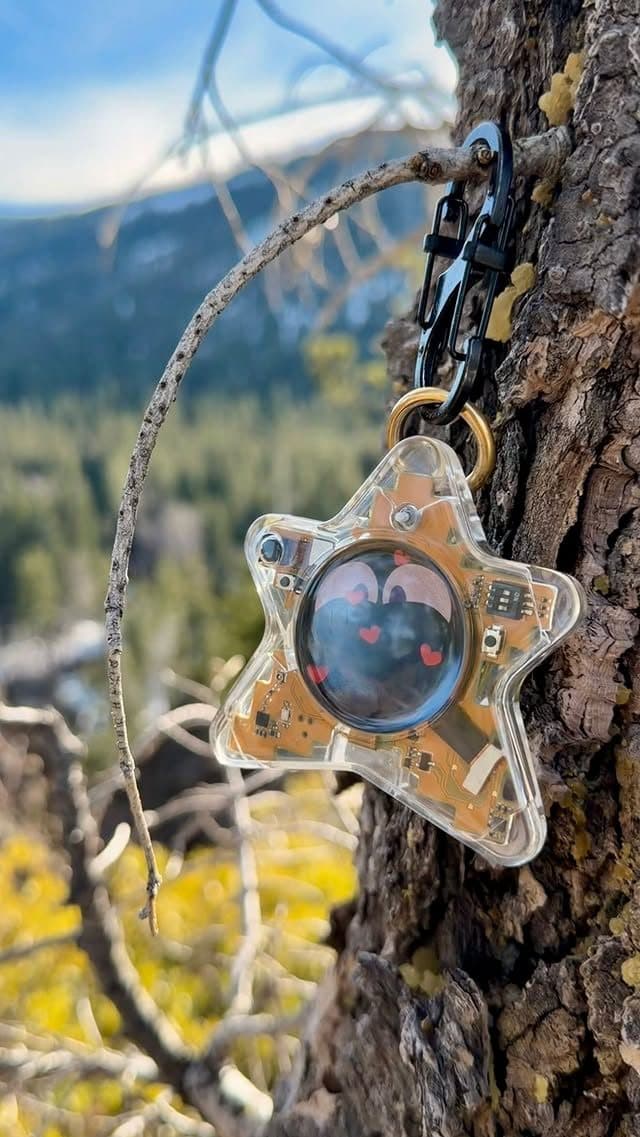
Oneira Dream Big+
Small enough to look playful. Built with a dual AI chip, OLED screen, and 1K camera, plus optional connected experiences you control.
Each $80 Founding Unit includes one Oneira device with a dual AI chip, OLED screen, and 1K camera, plus the selected color and included eye set. The 1K camera is included; its final production module and other non-material production details may change before fulfillment. Optional connected services, provider accounts, usage, and third-party fees are separate.
Oneira's expressive reactions run on the device, so its face can respond without relying on a cloud request.
See the local coreThe working prototype includes a dual ai chip, oled screen, and 1k camera. The 1K camera is included in the $80 Founding Unit; its final production module may change before fulfillment.
Inspect the hardwareOptional compatible connected services can extend Oneira when you choose. Setup, permissions, internet access, provider terms, and usage costs remain separate. Connected experiences work only with compatible services the owner deliberately configures. Oneira does not connect automatically to every service.
See compatible connectionsCompatible connected tools are optional and owner-configured. Nothing is preconfigured, and universal compatibility is not promised.
See connected featuresThe 1K camera supports deliberate, owner-triggered experiences. Optional Dream creation can transform a photo when the owner chooses it.
Open Oneira CreateOptional helper experiences have narrow, visible limits. Broader research, coding, and workspace actions remain in development.
Understand the agent pathA simple flow
Charge, power on, and confirm the face reacts to movement
Pair the device and review network and camera boundaries
Connect compatible services one at a time
Before pairing
Charge Oneira using the final guidance included with the unit, power it on, and confirm that the OLED screen and motion reactions behave as described.
Final production setup steps, cable guidance, and troubleshooting will be sent with order documentation before fulfillment. This page is a current product overview, not a substitute for the unit-specific guide.
Pairing + privacy
The app pairing flow should distinguish device communication, internet access, Sight capture, and third-party service access. A camera permission does not automatically grant every connected tool access to captures.
Sight still requires a deliberate owner-triggered capture. Everyone present must agree before an owner-triggered Sight capture.
Connected tools
Configure compatible models, agents, or connected services individually. Review the service's authentication, data policy, permissions, possible fees, and support status before use.
Use least-privilege access and remove services you no longer use.
Setup preview / establish boundaries first
A good setup process begins by separating the product's layers. The Working today foundation is the on-device motion-reactive face, so the first expectation should be an expressive hardware interaction rather than a silently connected assistant. Start by understanding the device's current role and the status labels around it before adding permissions or configuring another service.
Sight belongs in a distinct Connected beta step. It requires an owner-initiated request with one deliberate frame through an optional connected service; it does not record in the background. Before enabling or using it, decide where it is appropriate and keep private material out of frame. Everyone present must agree before an owner-triggered Sight capture. JML does not store the frame or reply in this release, though the active service still has its own controls.
Setup is also where service boundaries need to stay explicit. Translation and creator assistance are In development. Optional compatible connected tools and services are Connected beta paths that you intentionally configure in the app. Check compatibility, authentication, permissions, terms, availability, and possible fees before treating any one of them as part of your routine; universal compatibility is not promised.
Decision framework
Questions, answered
No. This page explains the current setup experience. Final device-specific setup, charging, and troubleshooting documentation will be delivered before or with fulfillment.
The core expressive motion experience is designed to run on-device. Connected Sight, agents, models, and connected tools require app and network setup.
No. Connect only services you understand and plan to use, with the minimum permissions required.
The final setup documentation and Oneira update pages will carry production-specific troubleshooting information.
Oneira / current availability
500 Drop 01 units remain across 5 currently available colors. Availability is confirmed when secure checkout begins.
Preorder a Founding Unit · $80Oneira's focused helpers have narrow, visible limits. Broader research, coding, and approved-workspace actions remain in development.
The on-device motion-reactive face is the Working today experience. Begin there so the product has a clear purpose before any connected feature enters the picture. This prevents a setup process from accidentally turning a small companion into an assumed general AI service.
Sight is Connected beta and starts from one owner-triggered frame through an optional connected service. Use it only for a chosen moment that suits a short visual response. It is not a background camera, so no ongoing observation should be expected or configured.
Everyone present must agree before an owner-triggered Sight capture. Make that the default setup habit, alongside avoiding sensitive documents, credentials, private spaces, and uncertain situations. A camera permission on a device never substitutes for the people around it agreeing to a capture.
Translation and creator assistance are In development. Optional compatible connected tools and services are Connected beta integrations that require deliberate app setup; their availability, support, and terms can change. Keep them out of your initial routine until you have configured and verified the exact service you want to use.
Good fit
Choose differently