On-device reactions
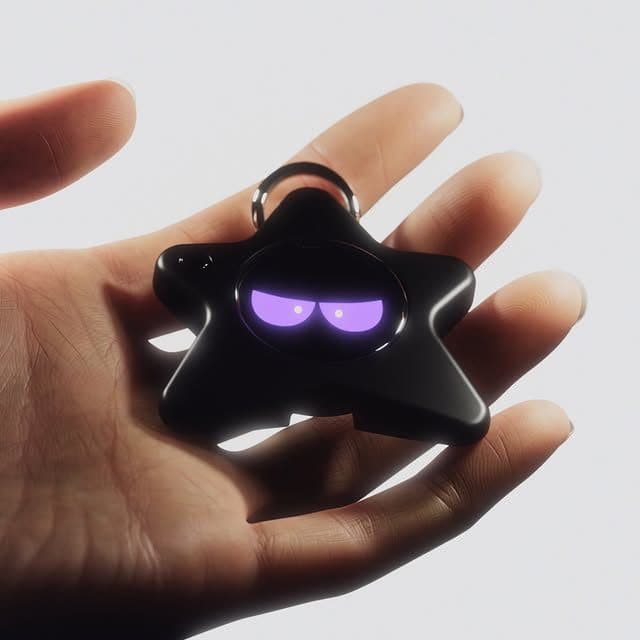
Oneira's expressive reactions run on the device, so its face can respond without relying on a cloud request.
See the local coreUse guide / practical and honest
A practical handbook for Oneira's motion reactions, intentional Sight modes, connected-tool hygiene, privacy, care, and current limitations.
Product status
Working today means the expressive face has been demonstrated on a real Oneira device.
Connected beta features require the Oneira app, internet access, a compatible service, and permissions you approve. They can change and may not work with every service.
Translation, creator help, and photography coaching are in development—not included product promises.
Specific third-party connections, storage, places, events, and offers are roadmap ideas—not product promises. No release date is announced.
The short answer
Oneira Dream Big+
Small enough to look playful. Built with a dual AI chip, OLED screen, and 1K camera, plus optional connected experiences you control.
Each $80 Founding Unit includes one Oneira device with a dual AI chip, OLED screen, and 1K camera, plus the selected color and included eye set. The 1K camera is included; its final production module and other non-material production details may change before fulfillment. Optional connected services, provider accounts, usage, and third-party fees are separate.
Oneira's expressive reactions run on the device, so its face can respond without relying on a cloud request.
See the local coreThe working prototype includes a dual ai chip, oled screen, and 1k camera. The 1K camera is included in the $80 Founding Unit; its final production module may change before fulfillment.
Inspect the hardwareOptional compatible connected services can extend Oneira when you choose. Setup, permissions, internet access, provider terms, and usage costs remain separate. Connected experiences work only with compatible services the owner deliberately configures. Oneira does not connect automatically to every service.
See compatible connectionsCompatible connected tools are optional and owner-configured. Nothing is preconfigured, and universal compatibility is not promised.
See connected featuresThe 1K camera supports deliberate, owner-triggered experiences. Optional Dream creation can transform a photo when the owner chooses it.
Open Oneira CreateOptional helper experiences have narrow, visible limits. Broader research, coding, and workspace actions remain in development.
Understand the agent pathA simple flow
Carry, tilt, move, and glance at the expression
Capture one frame in notice, read, or help
Route a request to a compatible chosen tool
Motion + handling
Oneira's face responds to movement and handling. Keep the OLED screen and camera area clean, and use the final included carry and charging guidance for the production unit.
The expressive layer is designed for quick moments, not constant management.
Sight etiquette
Everyone present must agree before an owner-triggered Sight capture. Frame only what the mode needs, avoid sensitive documents, and do not use Sight to identify a person.
Use notice for a scene or object, read for visible text, and help for short object or task guidance.
Connected-service hygiene
Connect only compatible services you trust. Use separate credentials where practical, grant the minimum access, review activity, and revoke unused connections.
A connected response can be wrong or a tool can fail. Review important output before relying on it or sending it elsewhere.
Practical use / keep the layers visible
The first rule of a useful Oneira handbook is to start with what needs no cloud claim: the animated face reacts to motion on the device. Treat that Working today layer as the everyday companion behavior. It is the part you can enjoy freely without converting a normal interaction into a prompt, a recording, or a request to an external service.
The second rule is to choose Sight deliberately. Sight is Connected beta: an owner starts one request, captures one frame, and receives a short notice, read, or help response through an optional connected service. It does not record in the background. Everyone present must agree before an owner-triggered Sight capture. JML does not store the frame or reply in this release. Frame only what you need, avoid sensitive material, and verify anything important.
The third rule is to keep service status visible in daily use. Translation and creator assistance are In development. Optional compatible connected tools and services are real Connected beta paths, each with intentional app setup, permission, and availability boundaries. A good handbook shows when to rely on current behavior, when to use beta carefully, and when to wait for creator or translation work rather than improvising a workflow.
Decision framework
Questions, answered
Final numbered-device instructions, charging guidance, and troubleshooting will be provided through official order and setup documentation.
Use notice for a short scene or object description, read for visible text, and help for short object or task guidance.
Use trusted services, least-privilege permissions, strong authentication, regular access review, and independent verification of important output.
No. Oneira and connected AI are not emergency, medical, legal, or safety systems. Use authoritative services and qualified professionals.
Oneira / current availability
500 Drop 01 units remain across 5 currently available colors. Availability is confirmed when secure checkout begins.
Preorder a Founding Unit · $80Oneira's focused helpers have narrow, visible limits. Broader research, coding, and approved-workspace actions remain in development.
The on-device motion-reactive face is the Working today baseline. Use that layer as an expressive interaction, not a test of AI performance. This keeps the product's simplest promise clear and avoids treating every movement or moment as a connected-service event.
Sight is a concise, owner-triggered visual request, not a general authority. Use it for a low-stakes scene, visible text, or object or task question that you can frame clearly. Keep emergencies, identity claims, medical, legal, access, and safety decisions out of scope.
Everyone present must agree before an owner-triggered Sight capture. No background recording occurs, and JML does not store the frame or reply in this release, but connected processing still applies. Ask first, choose a narrow frame, and do not send confidential material.
Translation and creator assistance remain In development. Optional compatible connected tools and services are Connected beta integrations; review their authentication, permissions, data handling, availability, and support before configuring them. Do not assume every service is compatible.
Good fit
Choose differently